Imprint & Privacy
Cast Spells on Product Discovery
CastSpells vs Craft.io: A Practical Comparison for Modern Product Teams
Picking a product management platform is rarely about “who has roadmaps.” It’s about what you want the tool to enforce on busy weeks, when context gets lost and decisions get political. The fastest way to choose is to look at what each platform optimizes for, and what it assumes you’ll do elsewhere. That’s where the real tradeoffs show up.
This post compares Craft.io and CastSpells Product AI with one goal: help you decide which one fits the way your team actually works. It’s written for PMs who live in messy evidence, shifting priorities, and stakeholder questions that start with “why.” It’s also written for teams that want a tool that feels good at scale, not just on day one. You’ll get a plain-language summary plus pros and cons for each option.
Quick take
If you want a one-paragraph answer, here it is. Craft.io shines when you need a flexible, customizable product system for complex orgs, and you care a lot about tailoring workflows. CastSpells Product AI shines when you want discovery, validation, and planning to stay connected to evidence, so “why are we building this?” is answered inside the plan instead of in someone’s memory.
Choose Craft.io if your top priorities are workflow customization, portfolio-style views, and enterprise onboarding/support.
Choose CastSpells Product AI if your top priorities are evidence-linked discovery, hypothesis/assumption validation, and PRDs that stay connected to research.
What Craft.io emphasizes (based on their public positioning)
Craft.io positions itself as a flexible, all-in-one product management platform. On their “Productboard vs Craft.io” page, they highlight centralized product work “from feedback to execution,” customization for large organizations, and enterprise-grade onboarding and support. They also call out capabilities like portfolio management, sprint planning, OKRs, dashboards, and “Excel-like” functionality, which signals a strong emphasis on configurable planning and visualization.
That positioning matters, because it hints at Craft’s default mental model. The tool is designed to help you organize product data and adapt workflows to your org, especially when multiple teams and products need consistency without losing flexibility. If you’re comparing tools for a larger organization, those are real advantages and worth evaluating carefully. The source used for this section is Craft’s page here: https://craft.io/productboard-vs-craft-io-lp/
What CastSpells Product AI is built to do
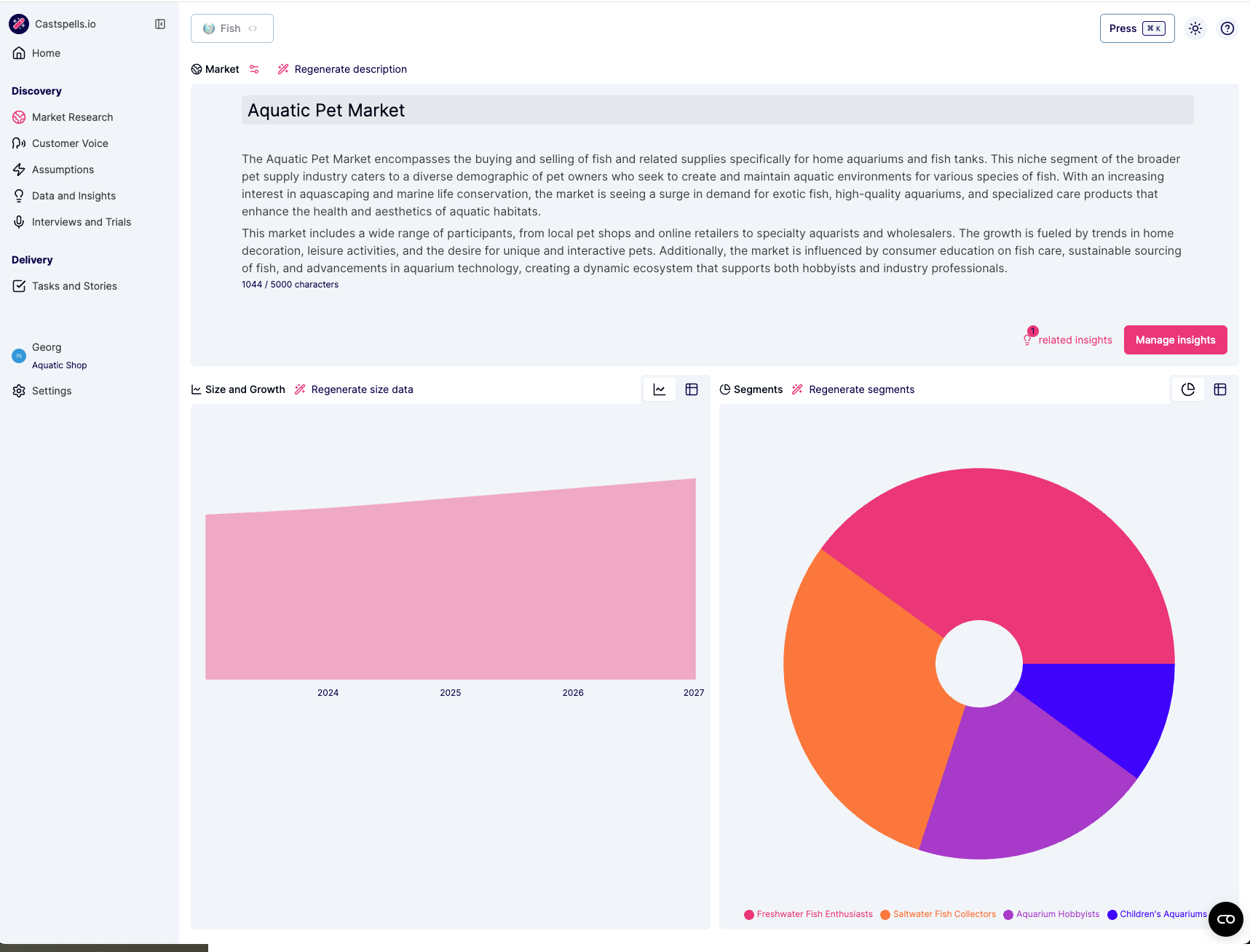
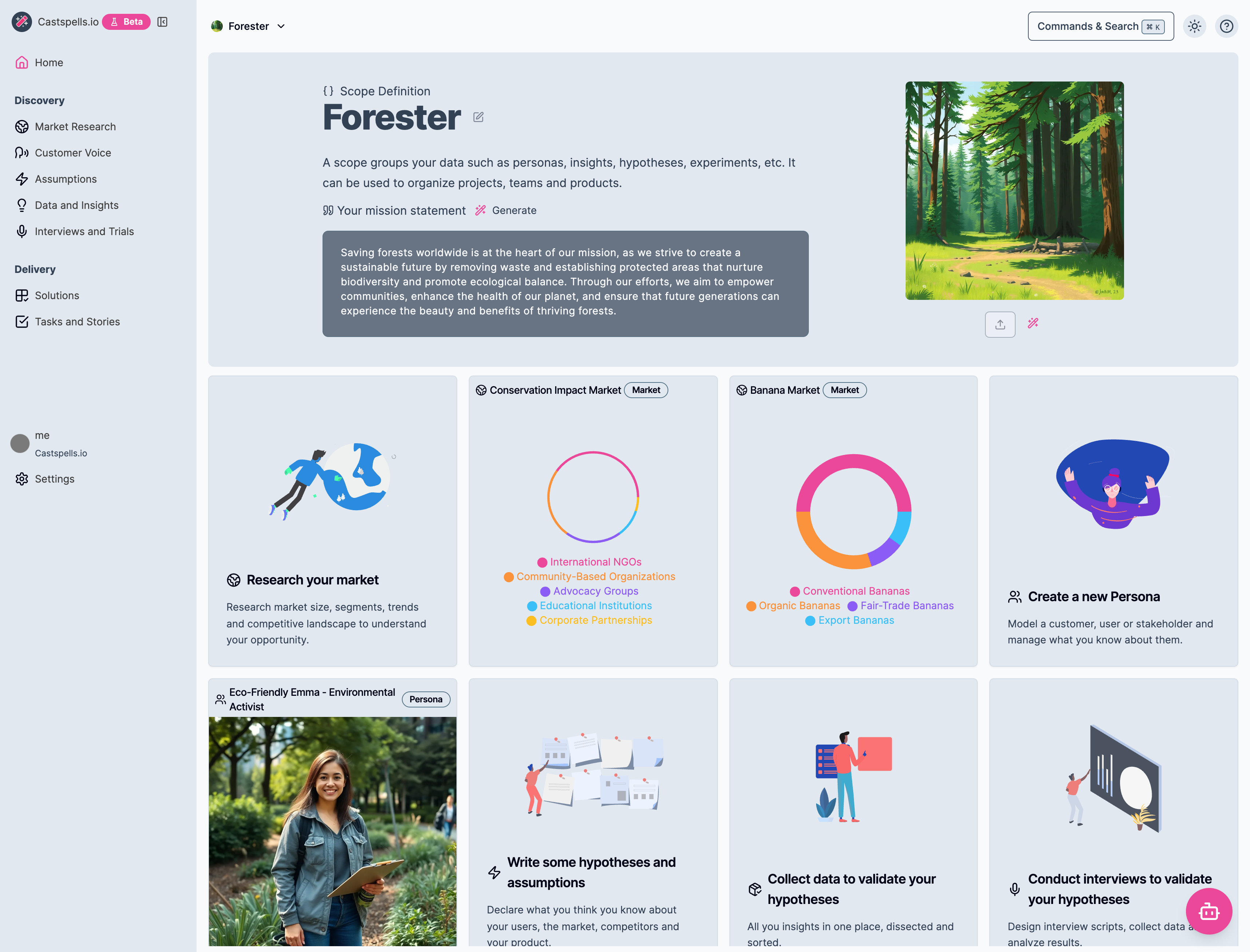
CastSpells Product AI (Castspells.io) is built around a different default: your roadmap and PRDs should stay attached to the evidence that earned them. The platform has structured spaces for Market Research , Customer Voice & Personas , Hypotheses/Assumptions , Interviews & Trials , and Data & Insights , and it’s designed so those objects can be embedded directly into planning docs. The point is simple: when research changes, the plan stays honest without a big manual rewrite.
Practically, this means you can collect validation data (including links and uploaded files), generate and manage insights, and connect those insights back to assumptions and requirements. You can run structured interviews and trials, and then flow the learnings into your personas, hypotheses, and PRDs. When it’s time to align with stakeholders, the “why” is one click away inside the doc you’re reviewing.
Pros and Cons
Here’s a pros/cons breakdown that reflects what each platform is optimized for. This section is intentionally practical, because most teams don’t fail due to missing features. They fail because their tooling quietly pushes them toward habits that don’t match their reality.
CastSpells Product AI
Pros
Strong evidence-linked workflow from discovery to PRDs and roadmaps, which keeps context attached to decisions.
Built-in market research, personas/customer voice, hypotheses, interviews/trials, and validation data/insights that can be connected to planning.
PRDs can embed live research objects, which reduces drift when evidence changes and makes reviews less about archaeology.
“Spells” AI assistance is designed to work across the research and planning workflow, not just at the surface layer.
Great fit when the main risk is building the wrong thing because evidence gets lost across tools and documents.
Cons
If your org’s biggest requirement is deep workflow customization for many teams, you may need to confirm fit against your exact process.
If you rely heavily on OKRs/portfolio dashboards as first-class objects, you may need conventions or complementary tooling depending on how your org runs planning.
Teams that want a lightweight, feedback-only workflow may find the evidence-first structure “more process” than they’re ready to adopt.
Craft.io
Pros
Strong emphasis on flexibility and customization at scale, which is valuable in complex orgs with multiple teams and products.
Positions itself as an all-in-one platform “from feedback to execution,” which can reduce tool sprawl for planning and coordination.
Explicit messaging around portfolio management, sprint planning, OKRs, dashboards, and “Excel-like” functionality suggests strong planning/visibility features.
Enterprise-grade onboarding and support are highlighted heavily, which can matter more than features in large rollouts.
Cons
Evidence-linked discovery workflows (hypotheses, structured interviews/trials, validation data to insights traceability) may depend on setup, integrations, or process rather than being the default path.
If your team’s core pain is “we lose the why,” you’ll want to pressure-test how easily evidence stays attached to requirements during review and execution.
Flexibility can become a downside if every team customizes differently, because it can make organization-wide standards harder to maintain over time.
What “better” looks like in a real week
Imagine you’re in a stakeholder review and someone challenges a requirement. In a doc-first workflow, you often end up narrating the backstory while people debate opinions, and you promise to “send the research later.” In an evidence-linked workflow, you open the PRD and show the linked interviews, validation data, and insights right next to the requirement, and the discussion moves from opinions to tradeoffs. That’s the difference between “trust me” and “here’s the proof,” and it keeps the room focused on decisions instead of debate.
That’s the difference CastSpells is optimized for. It’s not trying to be a prettier document editor; it’s trying to keep discovery artifacts, validations, and plans in the same system so context doesn’t evaporate. If your team frequently ships features that turn into “nice-to-have” usage graphs, this is the kind of friction you want the tool to add.
Here are a few examples of what that linkage looks like in practice. The screenshots below aren’t “nice UI for its own sake”; they show the mechanics of keeping evidence and planning connected. If your team currently does this with links and copy/paste, this is the workflow you’ll want to test in a trial.
Interviews & Trials gives you a structured place to plan and run discovery conversations. The goal is consistency across sessions, so insights are comparable instead of anecdotal. When interviews are linked to assumptions and personas, it’s easier to explain what changed and why.
Data & Insights is where raw evidence becomes reusable learnings. You can attach links and files, generate summaries, and connect insights back to assumptions you’re trying to validate. When someone asks “what did we learn?”, you can answer with traceable artifacts instead of a slide deck.
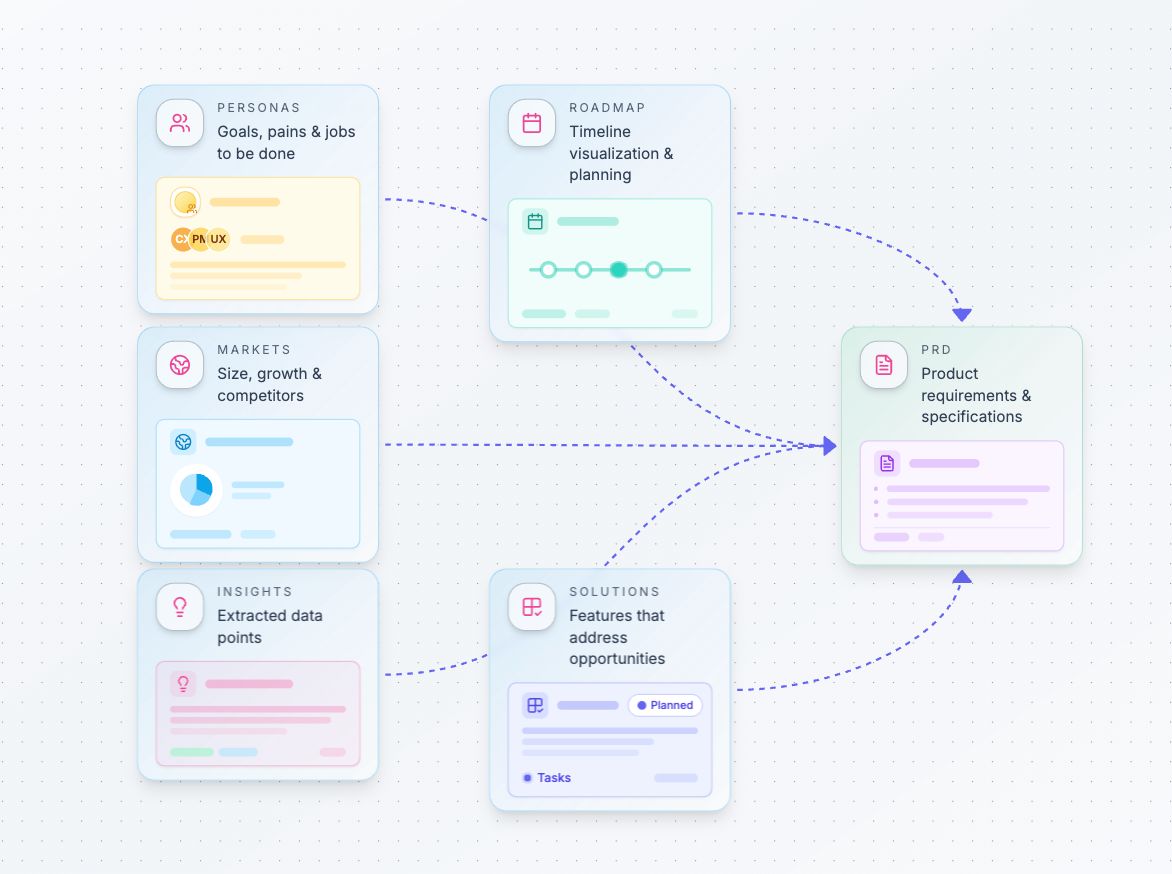
PRDs in CastSpells can embed live objects from your workspace. That means markets, personas, hypotheses, and insights don’t have to be rewritten into a document to “count.” When the underlying evidence changes, your PRD stays honest without a rewrite sprint. This keeps plans shorter, reduces drift, and makes reviews less about archaeology.
Roadmaps connect the plan to work items that already have context. Instead of a timeline that floats above reality, the roadmap can reflect the same hypotheses, solutions, and tasks the team is actually working through. That makes roadmap conversations more about sequencing and dependencies, and less about arguing the premise.
How to evaluate both tools in 30–60 minutes
If you want to make this decision quickly, run a short, scenario-based evaluation. Pick one real initiative that has messy evidence and at least one contentious tradeoff. Then try to answer the same questions in each tool without hand-waving or “we’ll track that somewhere else.” You’ll learn more in 45 minutes than in a week of feature-page browsing.
Use this checklist and keep the bar consistent. The goal is not to “finish the setup,” but to see how the tool behaves under real ambiguity. If a step feels awkward during the eval, it will be painful in production.
Can you attach raw evidence (links, uploads, notes) to a decision and find it later?
Can you turn evidence into structured insights and connect those insights to assumptions?
Can you embed the “why” directly into the PRD, next to requirements, without copy/paste?
Can you explain priorities with something more solid than “my intuition says”?
Can your stakeholders self-serve the backstory without a meeting?
If Craft’s customization and enterprise rollout support are your biggest risk reducers, it will likely feel like the safer bet. If your biggest risk is building the wrong thing because evidence gets lost between tools, CastSpells will feel purpose-built. The right choice depends on where your team is currently paying the most “coordination tax.” If you’re unsure, write down your most expensive failure mode and pick the platform that actively prevents it.
Ready to try CastSpells?
CastSpells Product AI helps teams move from assumptions to evidence and keep that evidence connected all the way into PRDs and roadmaps. It’s especially strong for teams that want structured discovery workflows, hypothesis validation, and planning that stays honest as learnings change. If that sounds like your problem, it’s worth a quick trial with one real initiative.
Start Your Free Trial and see what it feels like when the “why” stays attached to the plan. Use one real initiative and invite one skeptical stakeholder, because that’s the fastest way to pressure-test traceability. If it makes reviews calmer and decisions faster, you’ll feel it immediately.
Join the waitlist and adopt
ultimate product discovery
ultimate product discovery
Join the waitlist and adopt
ultimate product discovery
ultimate product discovery